
Maktaba, the server
The app called simply Maktaba is the home itself: the server that keeps the library, transcribes the videos, runs the search and the Live TV channels, and streams to every other app. Its window shows the web app.
Who it is for
Whoever runs the home, on a Mac, a Windows PC or a Linux computer. Everyone else uses the other apps, or the web app in a browser.
What it does
- Runs the whole server on this computer: the database, the processing pipeline and the streaming. It starts when you sign in, keeps running when the window is closed, and a menu-bar or tray item shows how it is doing.
- Or connects to another Maktaba: the window then shows a home that runs elsewhere, and nothing runs on this computer.
- First-run setup: the admin, the libraries, the models and the optional links to other services.
- Updates itself through signed updates; View → Big Screen turns the window into the big-screen view.
Platforms and how to get it
| Platform | Download from the latest release |
|---|---|
| Mac with Apple silicon (macOS 15 or later) | one .dmg, with the whole server inside; there is no Intel build |
| Windows | Maktaba_<ver>_x64-setup.exe, with the server inside, installed for the current user with no administrator |
| Linux (x86-64 and aarch64) | the .AppImage, .deb or .rpm; on a computer without a desktop, install.sh --app installs the server alone |
The project's README has the requirements and every way to install the home.
Screenshots
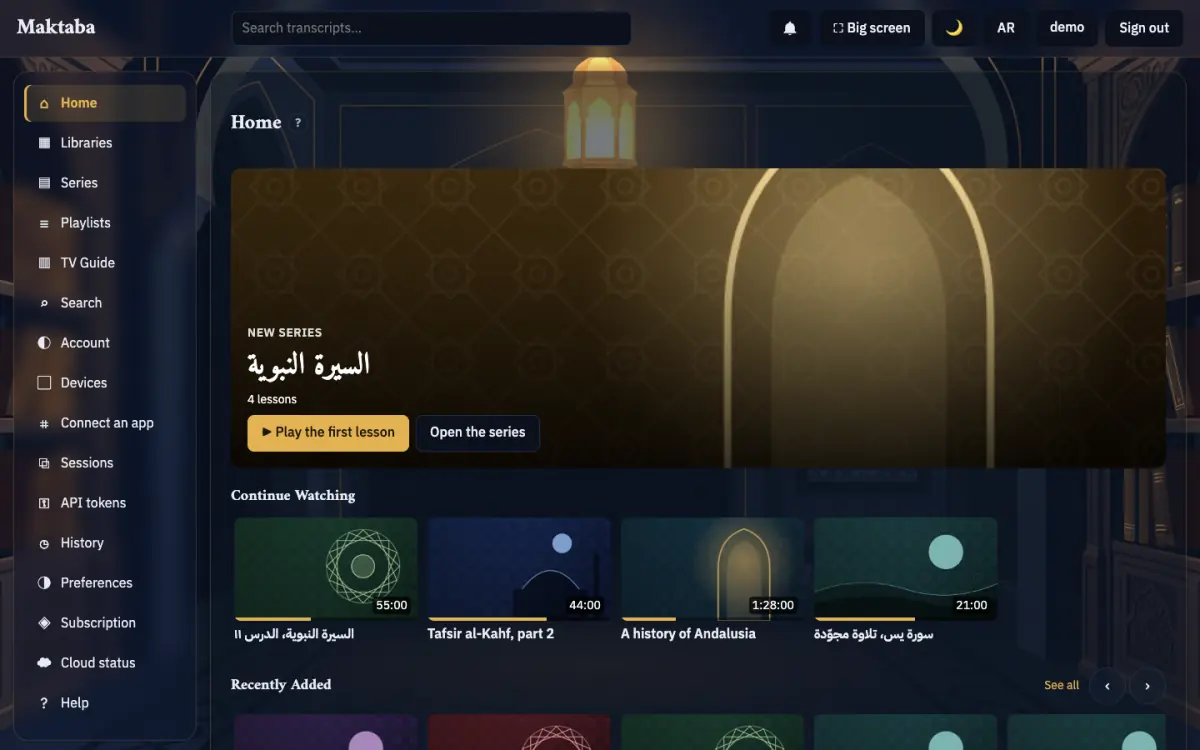
The window is the web app: see the web app for its pages and the big screen.
Every screenshot on these pages was taken in the dark theme on made-up test data: the Apple apps' screenshots come from their UI tests in CI, which run against a pretend home; the Android ones from the apps' screenshot tests; the web app and the big screen from a test home filled with invented libraries. The names, titles and codes in them are test data.